Is AI video generation finally ready to go beyond “AI slop” for real marketing use? Can one platform simplify the chaos of competing models like Sora, Veo, and Kling? And how much trial and error should you expect before getting usable output?

A Platform Designed for Exploration
One of FlexClip’s biggest strengths becomes clear almost immediately: this isn’t just a video tool, it’s an AI experimentation platform wrapped in a user-friendly interface.
From the main dashboard, FlexClip offers a wide range of starting points—AI text-to-video, image-to-video, photo editing, headshot generation, and more. Just as important, it makes it easy to jump between these tools and the full video editor.
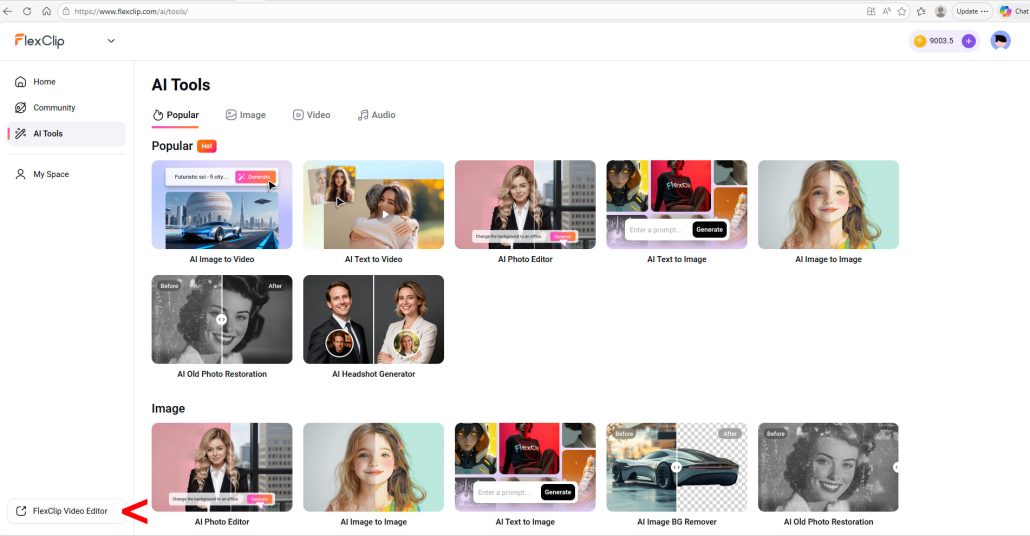

That may sound like a small UX detail, but it matters. Many AI video tools feel like isolated experiments. FlexClip feels more like a workspace, where you can test ideas, refine them, and assemble final outputs in one place.
The Core Idea: One Prompt, Many Models
To really evaluate FlexClip, I tested a single, detailed prompt across multiple video models within the platform.
Here’s the exact prompt I used:
Cinematography: Drone camera that follows the action from above and behind Nacho.
Subject: Nacho the corgi, see the photos I uploaded. He is wearing a pale blue Minnesota United FC Loons soccer jersey.
Action: Nacho is sitting on the sideline next to the coach. You can’t see the coach’s face as the drone camera is slightly above and behind them. A player comes off the pitch and Nacho is sent running on. He receives a pass, then deftly moves the soccer ball down the field using his nose and front paws. He scores a goal and is congratulated by his teammates. The drone camera follows all of this action.
Context: The inside of the Loon’s stadium, Alliant Field, at night under the stadium lights. The stands are full of fans.
Style & Ambiance: Almost photo-realistic, a cross between actual photography and very high-end animation.
Audio: The dull murmur of the crowd in the background, which rises to a loud cheer as Nacho scores. The entire clip is animated by a voice that sounds much like legendary actor John Houseman. The narrator script is: “Nacho finally got the chance he’d always dreamed of. Taking a pass from a Loons teammate, Nacho deftly pushed the ball down the field, until…goallll!”
Yes, it’s a bit whimsical. But that’s the point: a detailed, multi-layered prompt is exactly where AI video tools should shine—or struggle.
The Results: A Tale of the Models
Here’s where things get interesting.
FlexClip gives you access to a wide range of models—Kling, Grok, Sora, Veo, and more—each with different strengths. Running the same prompt across them highlights just how uneven (and evolving) this space still is.
Kling 3.0 — A Miss
Kling struggled right out of the gate. It didn’t follow the opening scene correctly, failed to render the jersey, and completely broke the physics of the goal (Nacho somehow scored from behind the net). Audio didn’t work at all.

Google Veo 3.1 — Surprisingly Weak
Veo produced inconsistent visuals (the jersey appeared and disappeared), unrealistic physics, and even basic errors (a player using his hands in soccer). It also mislabeled the stadium as “Alliant Fied,” which is…not ideal.

Grok Imagine — Some Improvement
Grok Imagine was better, but still flawed. The visuals were strong, but details like the jersey and ball physics were inconsistent. The narration worked, but didn’t match the requested tone.

OpenAI Sora 2 Pro — The Standout
This was the clear winner in my test. The jersey was accurate, the action made sense, and the goal sequence looked believable. The main issue was audio—the narration cut off before the climactic “Goallll!”

What This Actually Tells Us
At first glance, you might think this reflects poorly on FlexClip. It doesn’t at all. In fact, it highlights one of its biggest strengths:
FlexClip makes it easy to compare models side-by-side without switching platforms.
The variability isn’t a FlexClip problem—it’s a state-of-the-models problem. And FlexClip turns that into an advantage by letting you:
- Test multiple models quickly
- Adjust prompts and rerun
- Choose the best output for your use case
In other words, it embraces the reality that AI video today is still experimental—and gives you the tools to work within that reality.
Beyond Video: A Broad Creative Toolkit
While video is the headline feature, FlexClip also includes a wide range of AI-powered image tools. These span multiple leading models and approaches, including:
- Google Imagen and Nano Banana
- OpenAI GPT Image models
- Bytedance Seedream
- Flux and Hunyuan
- Grok Imagine Image
As with video, the takeaway is similar: you’ll want to experiment. Different models produce different styles and levels of realism, and FlexClip makes it easy to test and compare.
Among the wide range of image tools FlexClip offers are a photo editor, text-to-image, background remover, old photo restoration, object remover, image upscaler, and face swap. Just for fun, I tried a few of the special effects tools with Nacho: anime-style (disappointing); 3D cartoon (goofy, but captures his personality :-)); and action figure (solid but not “wow”):

Pricing and Accessibility
The free version of FlexClip is rather limited, but the paid tiers are reasonably priced (as of March 2026):
- Plus plan: affordable entry point for individuals at $11.99 per month
- Business plan: adds higher resolution, more exports, and expanded capabilities at $19.99 per month
Pricing changes frequently, but overall, FlexClip sits in a very accessible range compared to specialized video tools.
Ease of Use: Mostly True, With a Caveat
FlexClip claims you can use it “without any learning curve.” That’s a bit optimistic. But it is:
- Reasonably intuitive
- Well-organized
- Supported by a large library of tutorials
For most marketers and creators, the bigger learning curve isn’t the interface—it’s prompting and model selection.
Final Thoughts: A Practical Platform for an Imperfect Technology
FlexClip succeeds not because it eliminates the challenges of AI video—but because it acknowledges them.
For marketers, creators, and teams looking to:
- Experiment with AI video
- Produce social and marketing content
- Explore multiple models without juggling tools
…it’s a highly practical, cost-effective platform.
For advanced video professionals looking to master a single model at a deep level, it may feel too broad and simplified.
But for everyone else—including those just getting started—FlexClip hits a compelling balance:
Powerful enough to produce real results, approachable enough to learn quickly, and flexible enough to evolve alongside the technology.
And if nothing else, it proves one thing: Even if the models don’t always get it right…Nacho the corgi is always worth another try.
The review experience was 100% human (actually, more like 95% human and 5% corgi). ChatGPT assisted with compiling the first draft of this post based on reviewer notes.